OPERA RTC for Sentinel-1 (RTC-S1) Product Guide
This document is a guide for users of the OPERA Radiometric Terrain Corrected Backscatter for Sentinel-1 (RTC-S1) products. These products were developed by the Observational Products for End-Users from Remote Sensing Analysis (OPERA) project at NASA's Jet Propulsion Laboratory (JPL).
OPERA RTC-S1 products are archived in the OPERA_L2_RTC-S1_V1 collection.
OPERA RTC-S1 Products
OPERA's Radiometric Terrain Corrected (RTC) Synthetic Aperture Radar (SAR) Backscatter for Sentinel-1 (S1) product consists of radar backscatter normalized with respect to topography. The RTC algorithm used for the OPERA RTC-S1 products was developed by Gustavo Shiroma and others, and is available in the ISCE3 open source software library.
The RTC-S1 Level-2 products are projected into the appropriate UTM Zone or Polar Stereographic coordinate system for the location of each individual product and provided in Cloud-Optimized GeoTIFF (COG) format. The pixel values of the products represent gamma-0 power. The pixel spacing is 30 meters, and no speckle filter has been applied.
RTC products provide users with imagery of the earth's surface regardless of atmospheric conditions. This allows users to monitor surface processes during natural disasters, such as hurricanes or wildfires, or in areas that are prone to frequent cloud cover. Backscatter values can be used to determine surface water extent, soil moisture trends, surface roughness, and vegetation conditions.
Project Extent
On-Demand OPERA RTC-S1 products are available for any Sentinel-1 IW SLC burst acquired on or after April 14, 2016, for locations over land north of -60° latitude (i.e. all global landmasses except for Antarctica).
Digital Elevation Model (DEM)
Radiometric Terrain Correction requires the use of a Digital Elevation Model (DEM) both for correcting distortions caused by topography and for geocoding the output product. The OPERA RTC-S1 products are processed using the Copernicus GLO-30 DEM.
Polarization
Most Sentinel-1 acquisitions over land are collected in two polarizations, and the OPERA project generates RTC-S1 products for all available polarizations.
Sentinel-1 acquisitions over land generally have a vertical primary polarization, meaning that the SAR signal is sent out in a vertical orientation, but both the co-polarized returns (also vertically polarized) and the cross-polarized returns (horizontally polarized) are measured. This results in both VV and VH RTC-S1 products.
In some areas, particularly remote islands and regions close to the Arctic Ocean, acquisitions are collected with a horizontal primary polarization. This results in HH and HV RTC-S1 products.
Different polarizations are sensitive to different surface characteristics, with VV being more sensitive to surface roughness, VH or HV being more sensitive to volume scatterers such as vegetation, and HH being more sensitive to double-bounce scattering from objects that are perpendicular to the surface.
Processing Platforms
The OPERA Science Data System (SDS) platform is the operational system that generates new OPERA RTC-S1 products as Sentinel-1 acquisitions become available as SLCs. The OPERA SDS has produced RTC-S1 products for acquisitions over the project area since January 1, 2022.
ASF worked with the OPERA team to implement On Demand processing for OPERA RTC-S1 products using ASF's HyP3 platform. The HyP3 On Demand workflow uses the same algorithm that is used for products generated by the SDS, and HyP3-generated products were validated to ensure equivalency with SDS-generated products. The HyP3 platform was then used to generate OPERA RTC-S1 products back to April 14, 2016.
All OPERA RTC-S1 products, regardless of the production system used for generation, are archived in the OPERA_L2_RTC-S1_V1 collection and available from ASF.
Accessing OPERA RTC-S1 Products
OPERA RTC-S1 products in all available polarizations are archived for all Sentinel-1 acquisitions over landmasses (except Antarctica) since April 14, 2016. As new Sentinel-1 SLCs are added to ASF's archive, the OPERA project continues to process them to RTC-S1 products. New RTC-S1 products are generally available within 12 hours of the Sentinel-1 acquisition.
OPERA RTC-S1 products can be accessed using a number of methods:
- ASF's Vertex Data Search, which is a user-friendly and map-centric interface specialized for search and discover of ASF's SAR holdings
- Programmatically using the asf_search Python package
- NASA's Earthdata Search interface, which provides access to all of NASA's Earth Science datasets
For more information on options for accessing OPERA RTC-S1 products, refer to ASF's OPERA Sentinel-1 RTC tutorial. For more information on the technical specifications of the OPERA RTC-S1 products, refer to JPL's RTC Product Documentation.
ASF Data Search / Vertex
To search for OPERA RTC-S1 products in
Vertex,
select OPERA-S1 from the Dataset drop-down menu.
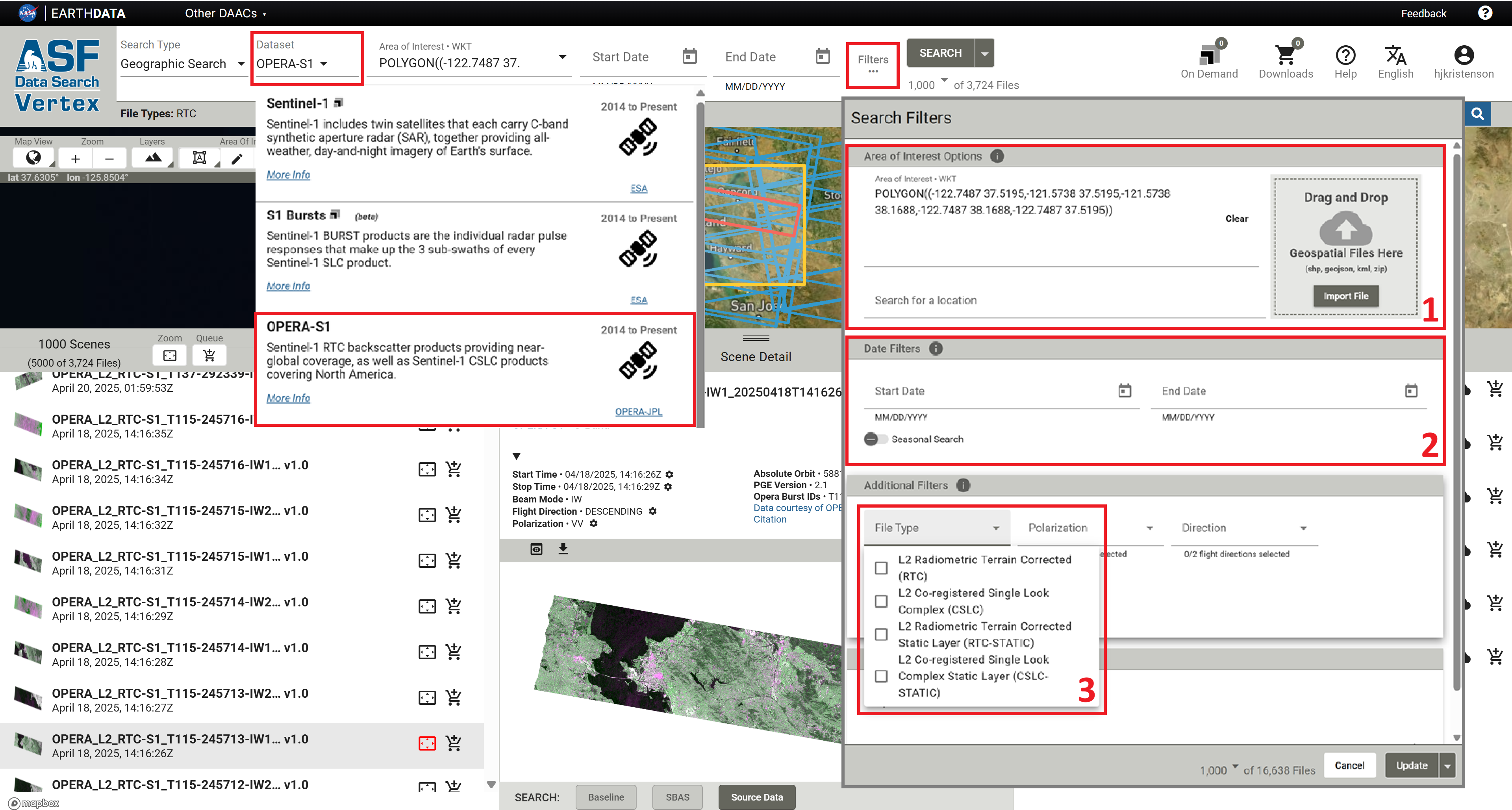
Because the OPERA RTC-S1 footprints are so small, there are millions of files in the archive. It is important to make use of the available search filters to find the products you want.
- Set an Area of Interest
- Set a date range
- In the Search Filters menu, select the
L2 Radiometric Terrain Corrected (RTC)File Type
For step-by-step guidance on searching for OPERA RTC-S1 products interactively using Vertex or programmatically using the asf_search Python package, refer to the ASF Data Search section of the OPERA Sentinel-1 RTC StoryMap tutorial.
Earthdata Search
OPERA RTC-S1 products are also available in Earthdata Search.
To learn more about accessing OPERA RTC-S1 products in Earthdata Search, refer to the Earthdata Search section of the OPERA Sentinel-1 RTC StoryMap tutorial.
Visualizations
There are a couple of options available for viewing OPERA RTC-S1 data interactively without having to download the data first.
NASA Worldview
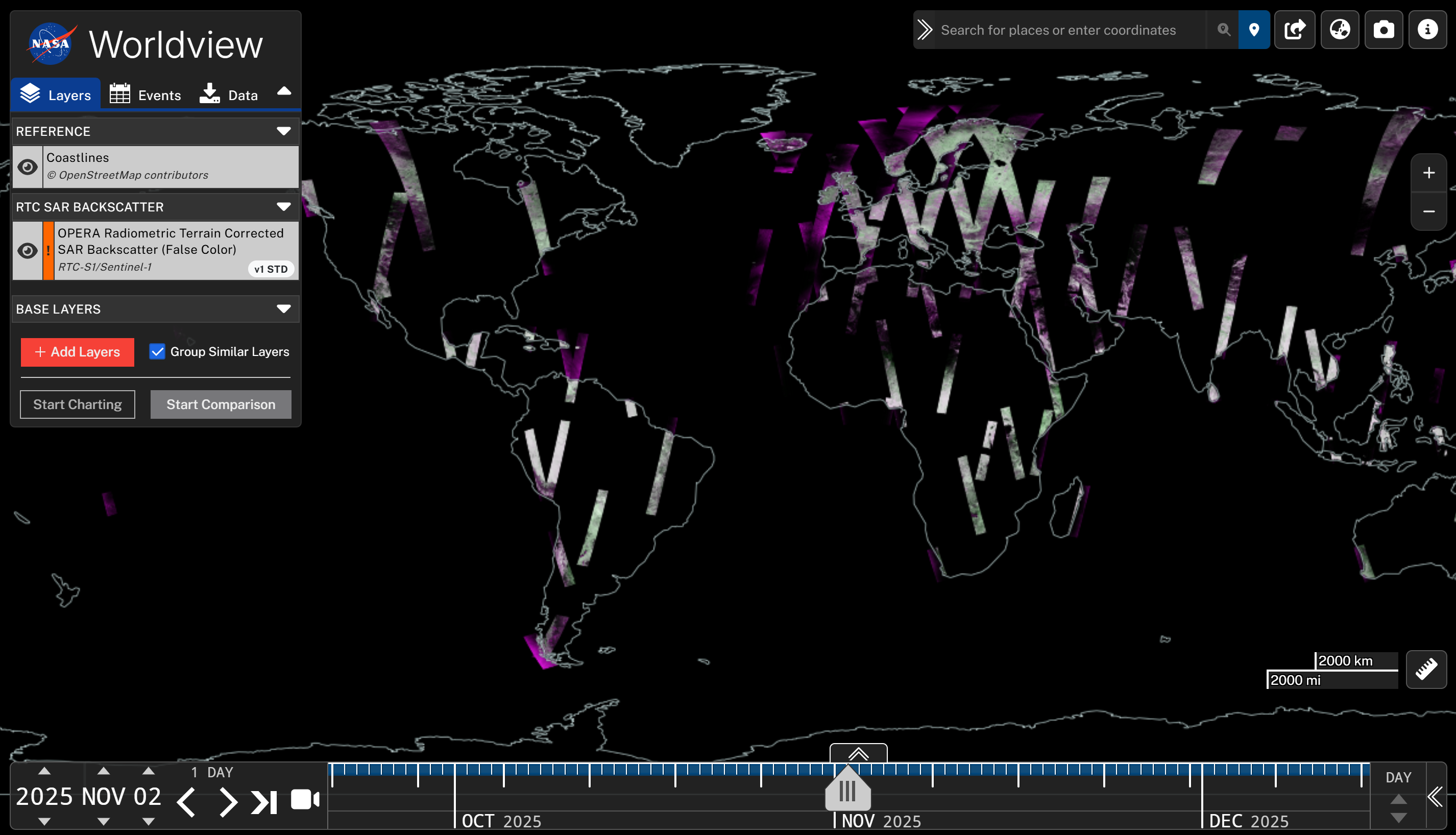
Daily visualizations for the OPERA RTC-S1 products are available in NASA's Worldview.
Learn more in the NASA Worldview section of the OPERA Sentinel-1 RTC StoryMap Tutorial, or click the Worldview image to launch the app.
Earthdata GIS Image Services
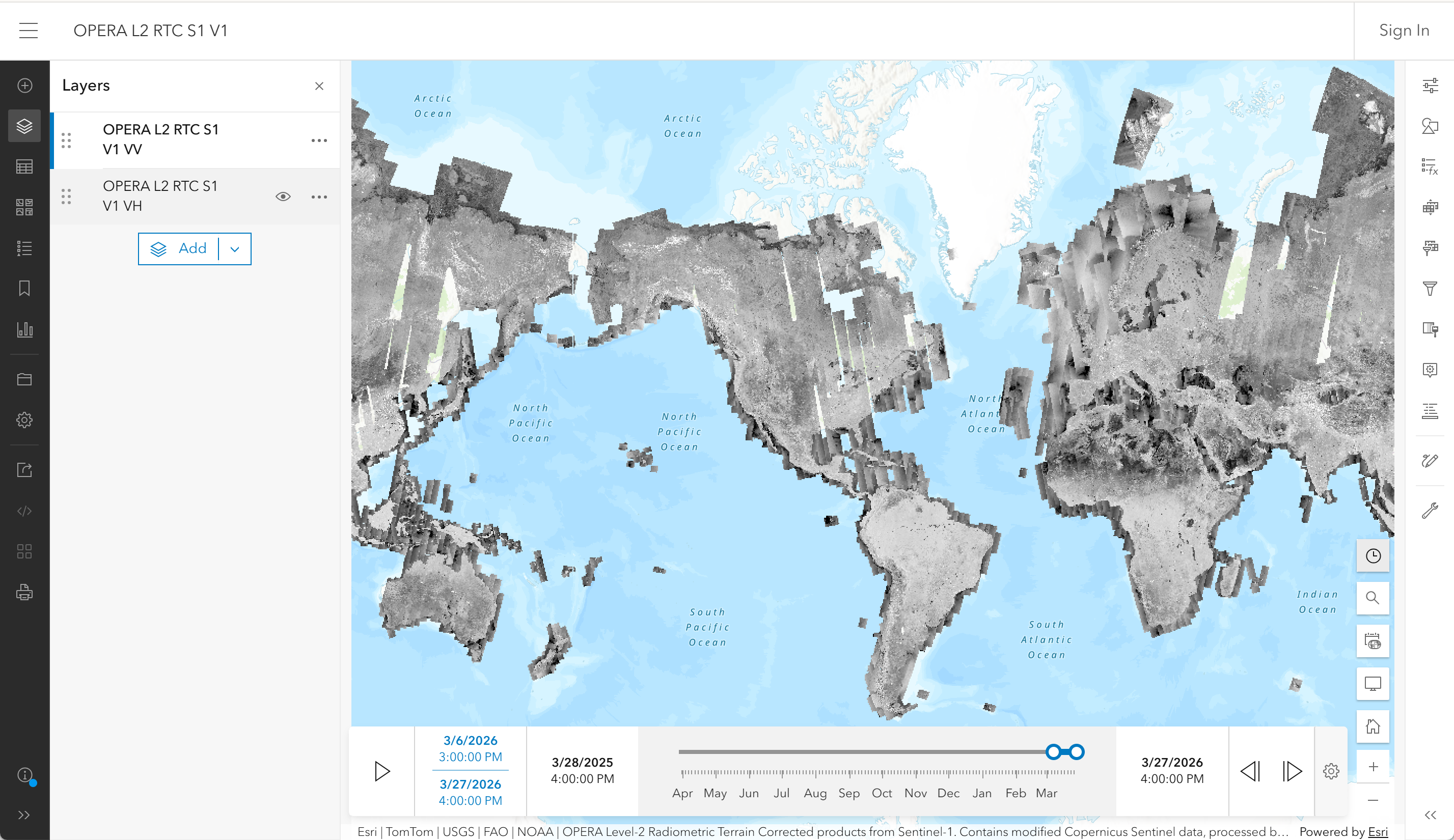
OPERA RTC-S1 image services are hosted on NASA's Earthdata GIS (EGIS) platform.
Learn more in the Earthdata GIS section of the OPERA Sentinel-1 RTC StoryMap Tutorial, or click the Web Map image to launch the app.
Product Packaging
OPERA RTC-S1 products are available as a collection of files associated with a source Sentinel-1 burst.
The naming convention for OPERA RTC-S1 products generated using HyP3 is the same as for the OPERA RTC-S1 products generated using the OPERA SDS.
L2 Radiometric Terrain Corrected (RTC) Files
If you search for OPERA-S1 products in Vertex, the results for each Sentinel-1 burst provide access to a number of files. If you click on an item in the left panel of the search results, the associated files are listed in the right panel.
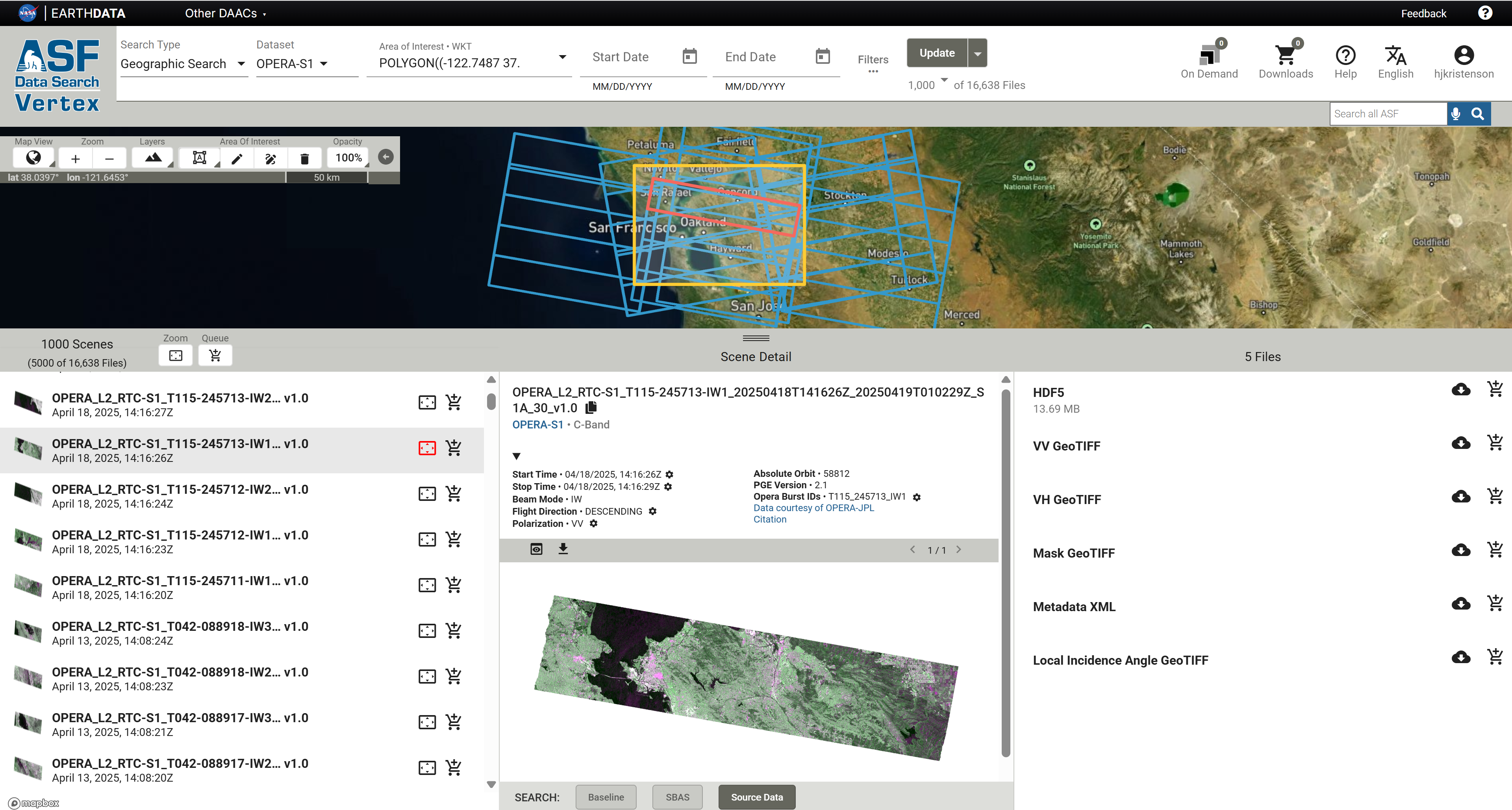
The files available for download include:
- HDF5 file containing product metadata, specifically orbit position and velocity (no actual RTC images are included in this file)
- A single-band 32-bit float Cloud-Optimized GeoTIFF (COG) file for each available polarization containing the RTC values (most commonly VV and VH, but HH and HV in some areas)
- Mask COG file indicating pixels in the RTC products that contain valid data and indicating which pixels are impacted by layover and/or shadow
- Metadata XML file containing information about the product in ISO format
- Local Incidence Angle COG file
L2 Radiometric Terrain Corrected Static Layer (RTC-STATIC) Files
There are some ancillary files generated during the RTC processing workflow that change very little through time.
Instead of including these ancillary products with each OPERA RTC product, they are generated once
for each Sentinel-1 burst ID and archived as Static Layer files.
Refer to OPERA's Product Specification Document for the OPERA Radiometric Terrain Corrected SAR Backscatter from Sentinel-1 Static Layers for more information on these files.
These RTC-STATIC products include the following COG files:
- local incidence angle
- incidence angle
- mask (layover/shadow validity mask)
- number of looks
- RTC Area Normalization Factor (ANF) gamma0 to beta0
- RTC ANF gamma0 to sigma0
You can access the RTC-STATIC files the same way that you would the RTC-S1 files. Applying a File Type filter of
L2 Radiometric Terrain Corrected Static Layer (RTC-STATIC) in Vertex will restrict search results to just the
static layers. Click the Filters... button to access the File Type drop-down menu.
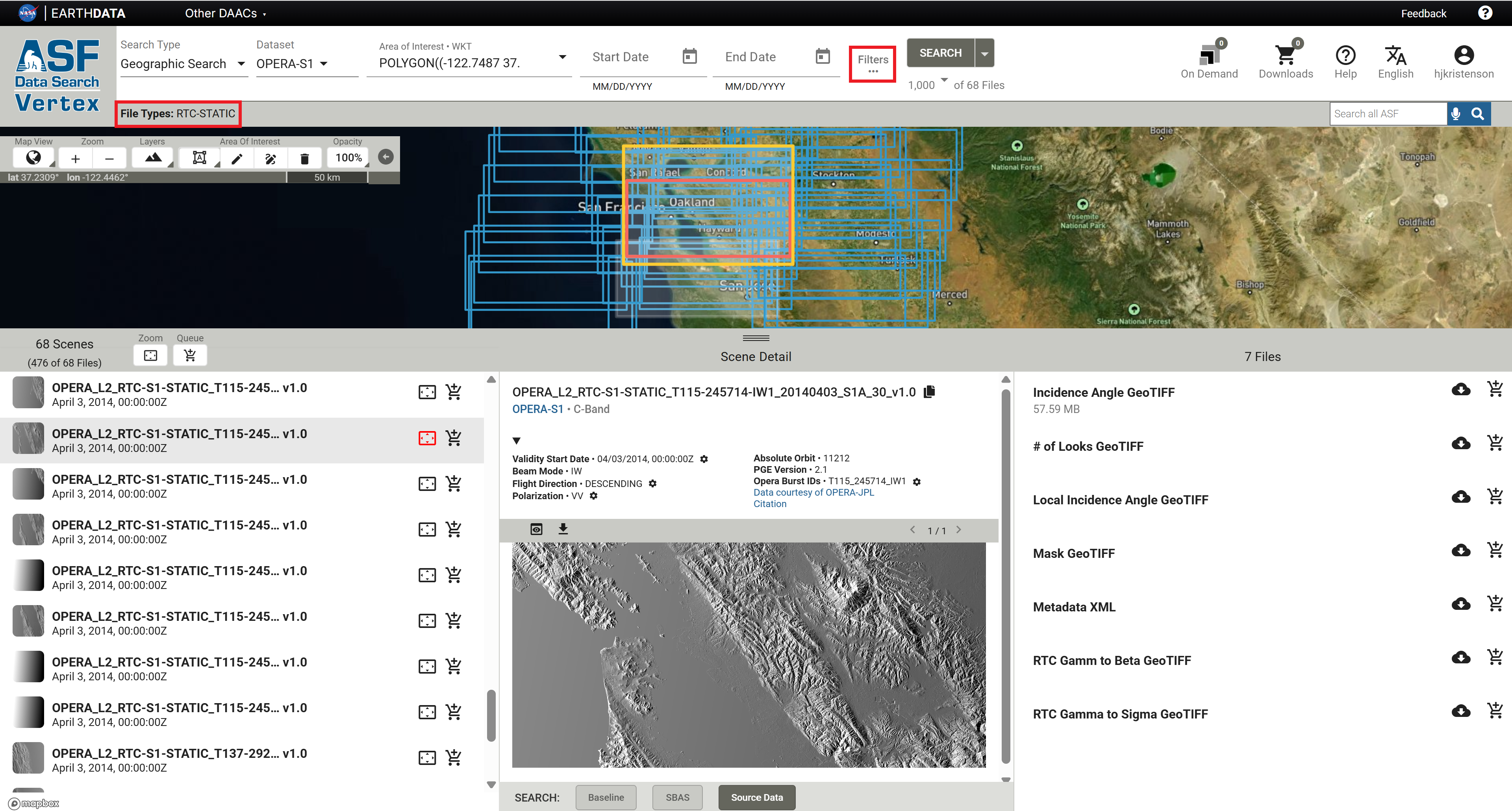
If you want to find the static layers that correspond to a specific RTC footprint, you can filter your RTC-STATIC search results using the OPERA Burst ID.
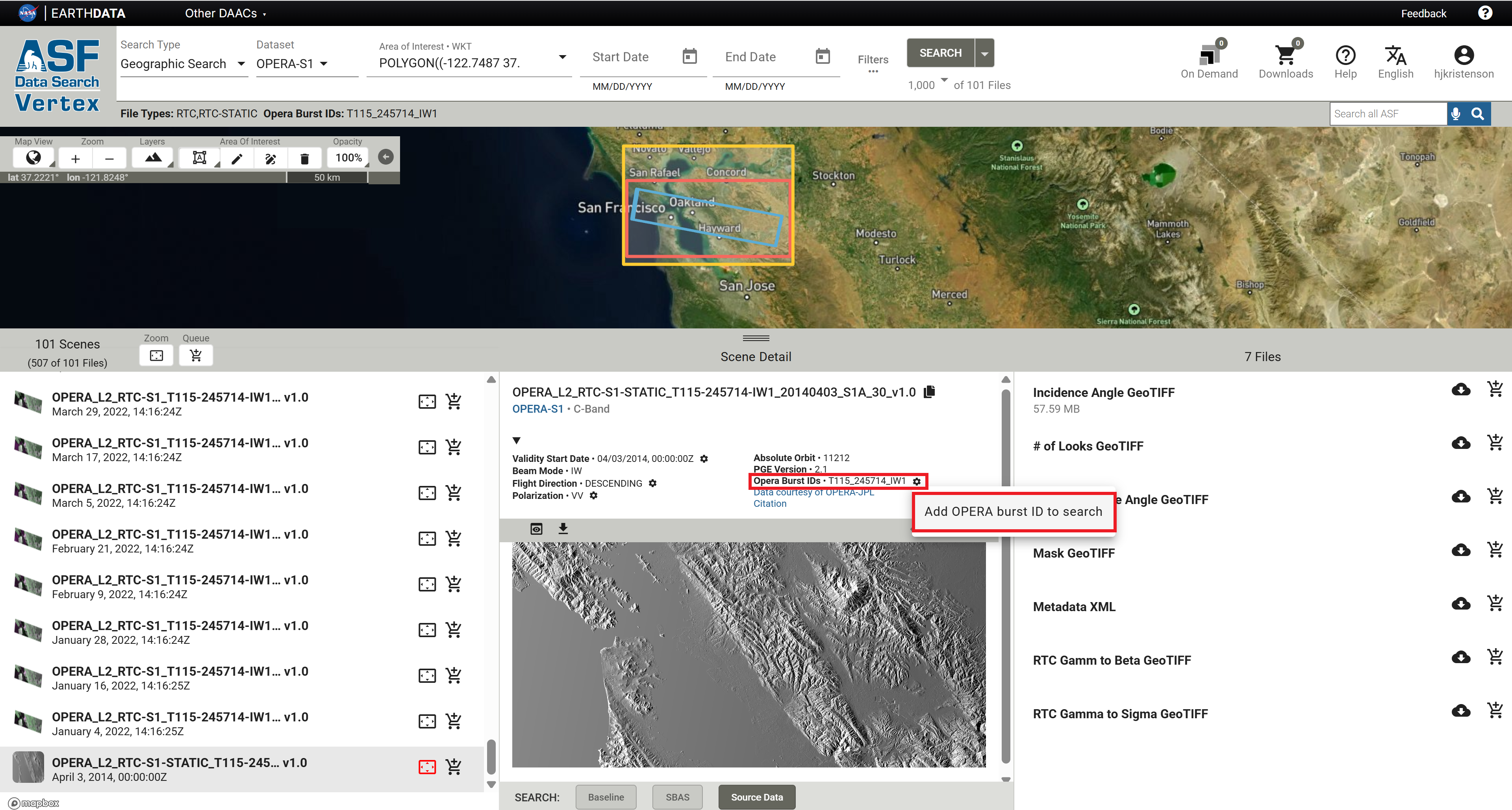
- In Vertex, search for both
RTCandRTC-STATICfile types for your area of interest. - Because the static layers all have an acquisition date set to
04/03/2014, 00:00:00Z, the static files may not be included in the results if a date range has been applied to the search. - Select an RTC product from the results list that has the desired footprint, and click on the icon button next to the Opera Burst ID.
- Select the option to
Add OPERA Burst ID to Searchand click the Search button again. - Make sure to clear any date range filters that do not include April 3, 2014.
- The search results will include only the products that have the designated burst ID. If there are too many results for the RTC-STATIC products to be included in the search results, open the Search Filters panel again and select only the RTC-STATIC product type to return only the static layers that correspond to that RTC footprint.
OPERA RTC-STATIC products not available for HH and HH+HV polarized scenes
The static layers associated with HH and HH+HV polarized acquisitions, located over some parts of Greenland and Arctic Canada, are currently unavailable in ASF's archive. We are working with the OPERA team to add these files to the ASF archive.
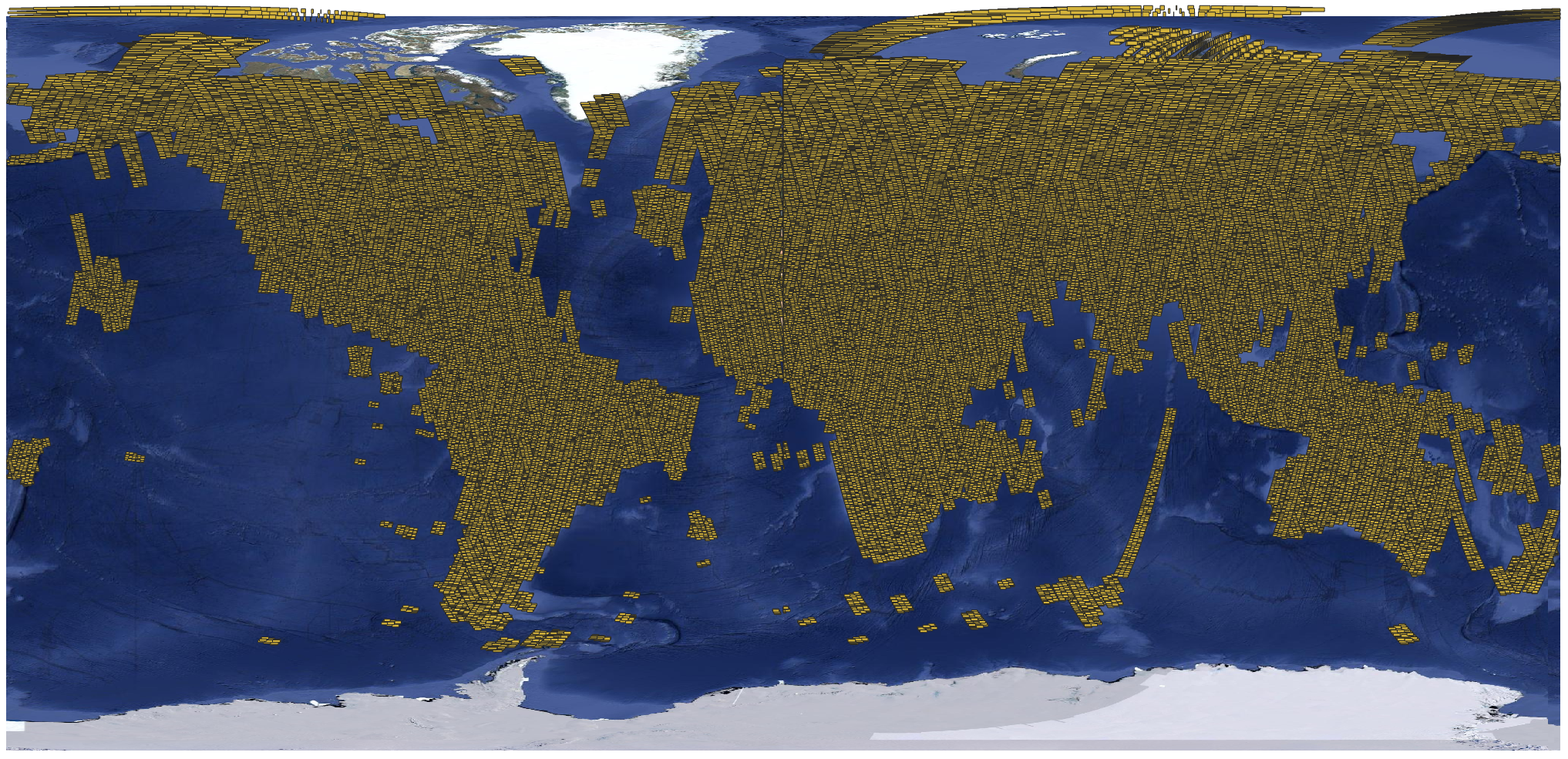
This graphic illustrates the current coverage of OPERA RTC-S1 Static Layers.
Duplicate layer names
There are Local Incidence Angle and Mask files listed in association with both the RTC search results
and the RTC-STATIC search results.
Local Incidence Angle
The Local Incidence Angle file can be downloaded using either link, but it is the same file. It is always named with
this pattern:
OPERA_L2_RTC-S1-STATIC_Txxx-xxxxxx-IWx_20140403_S1A_30_v1.0_local_incidence_angle.tif
The download URL behind the local incidence angle listings in both the RTC and RTC-STATIC results
reference the same source file.
Validity Mask
There is a file called Mask listed with both the RTC and the RTC-STATIC search results. Unlike the
local incidence angle file, these two mask files are NOT the same. Both are validity masks with the same pixel
value categories:
| Pixel Value | Description |
|---|---|
| 0 | Valid sample not affected by layover or shadow |
| 1 | Valid sample affected by shadow |
| 2 | Valid sample affected by layover |
| 3 | Valid sample affected by layover and shadow |
| 255 | Invalid sample (fill value) |
The main difference between the two files is that the data extent matches the other associated files. The
RTC-STATIC files have a larger extent than the RTC files, as data is included for the full raster footprint,
including the NoData pixels that are present around the edges of the RTC data products.
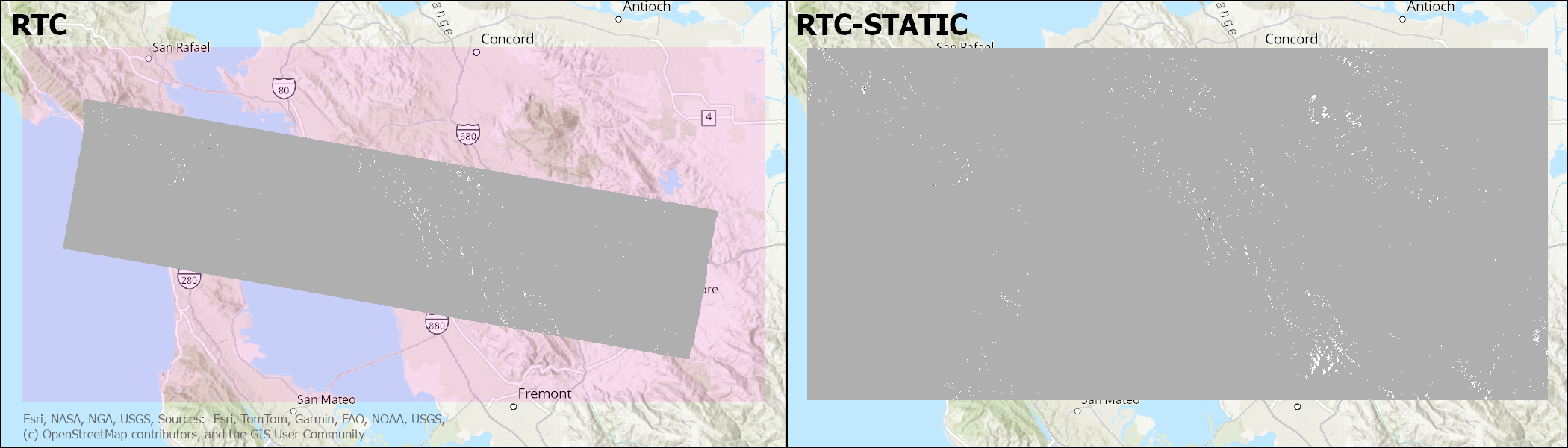
The mask file in the map on the left is the mask linked to the RTC search results.
OPERA_L2_RTC-S1_T115-245714-IW1_20250418T141628Z_20250419T010229Z_S1A_30_v1.0_mask.tif
The extent of NoData padding around the area that has valid radar data for that particular burst is displayed with a transparent pink color in this illustration, but would normally appear transparent. The mask values are only applied to the pixels with valid radiometry within the radar burst.
The mask file in the map on the right is the mask linked to the RTC-STATIC search results.
OPERA_L2_RTC-S1-STATIC_T115-245714-IW1_20140403_S1A_30_v1.0_mask.tif
It includes validity mask values for the full extent of the burst footprint, including the NoData padding around the pixels with valid radiometry within the radar burst. All of the static layers include data for this entire area.
There may, however, also be differences in the actual pixel values when comparing an RTC-STATIC validity mask to the validity mask included with a specific RTC product. Because orbits can shift slightly, the layover or shadow conditions for any given pixel may be different from one pass to another.
For investigating the layover/shadow impacts for a specific RTC product, users will generally be better served by using the validity mask delivered with that product rather than the mask available as a static layer.
Naming Convention
The file names of OPERA RTC-S1 products are designed to be unique and descriptive.
The following file-naming convention is used:
OPERA_L2_RTC-S1_[BurstID]_[StartDateTime]_[ProductGenerationDateTime] _[Sensor]_[PixelSpacing]_[ProductVersion]_[LayerName].Ext
For example: OPERA_L2_RTC-S1_T115-245714-IW1_20250418T141628Z_20250419T010229Z_S1A_30_v1.0_VV.tif
Table 1 describes the dynamic elements in the naming scheme.
| Element | Description | Example |
|---|---|---|
| BurstID | Unique burst identification string consistent with ESA burst map convention in the form of T[TrackNumber]-[ID]-[SubSwath] | T115-245714-IW1 |
| StartDateTime | The acquisition start date and time in UTC of the S1 SAFE file that was used as an input for processing (i.e. burst SLC) in the format YYYYMMDDTHHMMSSZ | 20250418T141628Z |
| ProductGenerationDateTime | The date and time (UTC) at which the product was generated by OPERA in the format YYYYMMDDTHHMMSSZ | 20250419T010229Z |
| Sensor | The input product sensor, including the specific Sentinel-1 platform | S1A |
| PixelSpacing | Product pixel spacing in meters | 30 |
| ProductVersion | OPERA RTC-S1 product version number with four characters, including the letter “v” and two digits indicating the major and minor versions, which are delimited by a period | v1.0 |
| LayerName | Name of the RTC-S1 product layer, if applicable | VV |
| Ext | File extension: “tif”, “h5”, or “png” | tif |
Example file names for each of the files associated with OPERA RTC-S1 products:
OPERA_L2_RTC-S1_T069-147170-IW1_20210205T163901Z_20220101T140222Z_S1A_30_v1.0.h5
OPERA_L2_RTC-S1_T069-147170-IW1_20210205T163901Z_20220101T140222Z_S1A_30_v1.0_VV.tif
OPERA_L2_RTC-S1_T069-147170-IW1_20210205T163901Z_20220101T140222Z_S1A_30_v1.0_VH.tif
OPERA_L2_RTC-S1_T069-147170-IW1_20210205T163901Z_20220101T140222Z_S1A_30_v1.0_mask.tif
Sentinel-1 RTC Products Available from ASF
In addition to the OPERA RTC-S1 products, which are generated using an RTC algorithm available in JPL's open-source ISCE3 software to perform radiometric terrain correction, ASF also offers On-Demand RTC products generated using commercial GAMMA SAR processing software.
These products are both high-quality Sentinel-1 RTC options, and you can use either with confidence for any given RTC-based analysis workflow. However, because ISCE3 and GAMMA use different algorithms for RTC processing, a time-series analysis will be more consistent if you don't mix and match OPERA RTC-S1 products and ASF's RTC GAMMA products.
There are some key characteristics that differ between the two products, which may help you decide which would be most appropriate for your particular application.
Spatial Extent
OPERA RTC-S1 products are processed on the basis of an individual radar burst extracted from a Sentinel-1 Interferometric Wide-Swath (IW) Single Look Complex (SLC) file, while ASF's RTC GAMMA On Demand products are generated using the Sentinel-1 Level 1 IW SLC or Ground Range Detected (GRD) file.
Advantages of burst-based products:
- RTC footprint is much smaller. Each IW SLC contains many individual bursts (most often about 27), and you may not need such extensive spatial coverage for your analysis. If you have a fairly small area of interest, you can download and mosaic only the bursts you need.
- File sizes are smaller. This is particularly important for users with limited internet access. Each OPERA RTC-S1 GeoTIFF file is on the order of 8 MB, and you can download each polarization separately. In contrast, ASF's RTC GAMMA products are delivered as a zip file, which includes all available polarizations. These zip files are generally upwards of 500 MB for products generated at 30-m pixel spacing, and they can be challenging to download successfully over slower connections.
- Footprints are consistent. The individual Sentinel-1 bursts always have the same extent from one acquisition to the next, which makes it very easy to generate a time series over an area of interest. The framing of the full Sentinel-1 IW Level 1 products can shift over time, so there is no guarantee that acquisitions with the same frame number will cover the same extent. This is particularly impactful when the area of interest is near the top or bottom of a Sentinel-1 IW Level 1 scene.
If your area of interest is large, and is well-covered by a full Sentinel-1 IW scene (or requires several full scenes to cover the entire area), you may find it easier to work with the full-scene RTC GAMMA products, as there would be fewer individual files to manage.
Processing Options
OPERA RTC-S1 products are output in gamma-0 power with 30-m pixel spacing. The only method currently available for ordering products with a different radiometry, scale, or pixel spacing is to order ASF's On-Demand Sentinel-1 RTC products processed using GAMMA software.
Learn more about the options available for processing full-scene Sentinel-1 RTC GAMMA products and why you might find them useful in the Processing Options section of the RTC On Demand! tutorial.
RGB Decomposition
It can be helpful to combine co-polarized and cross-polarized RTC values into a false-color image. There are a number of methods for combining VV and VH or HH and HV into the red, green, and blue channels, which is commonly called RGB Decomposition.
The RGB Decomposition approach used by the OPERA team for the RTC-S1 products is very different from the approach ASF uses for the Sentinel-1 RTC On Demand products processed using GAMMA.
OPERA RTC-S1 RGB Decomposition
The OPERA project uses a simple approach to combining polarizations to generate a color browse image, which is displayed in Vertex when you search for OPERA RTC-S1 products. This RGB Decomposition assigns the co-pol values (VV or HH) to both the red and blue bands, while the cross-pol values (VH or HV) are assigned to the green band. Scalars are applied to the different bands to balance the color range.
In these color images, water generally appears black, areas with vegetation appear more green, and other areas appear pink.
You can download these browse images from the Vertex interface by selecting an RTC-S1 product from the list of search results and clicking the download icon above the image preview in the center panel, as shown in Figure 1. Note that these browse images are not georeferenced, though you can use the individual RTC GeoTIFFs as a reference for manually georeferencing the browse images.
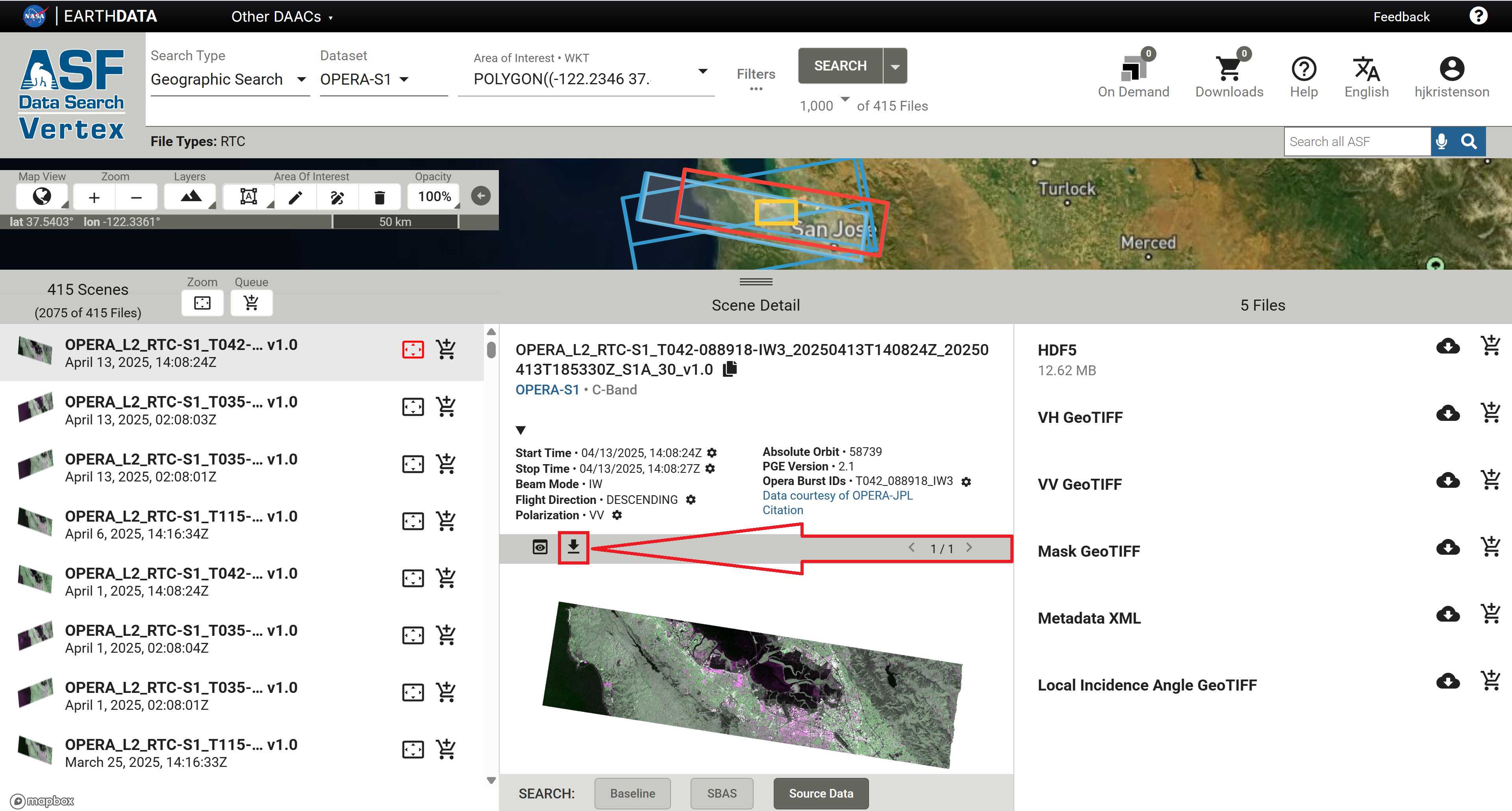
This approach is also used to generate the imagery tiles for OPERA RTC-S1 that are displayed in NASA's Worldview platform.
You can also create your own OPERA RTC-S1 RGB Decompositions using GIS software.
- In ArcGIS, use the Composite Bands geoprocessing tool or raster function template to assign the VV and VH layers to the desired color channels.
- In QGIS, use the Build Virtual Raster algorithm.
RTC GAMMA RGB Decomposition
Sentinel-1 RTC On-Demand products processed using GAMMA software include a georeferenced RGB Decomposition browse image in the product package by default. You also have the option to include a full-resolution RGB Decomposition GeoTIFF in the output package when submitting the RTC job for processing.
The algorithm used to generate the RGB Decomposition images included in the product package is very different from the approach used by the OPERA team. It uses a series of thresholds to determine which values to attribute to the different color bands, and applies scalars to each band to generate an intuitive false-color image.
For pixels with very low values in both the co- and cross-pol RTC products, the co-pol values are assigned to the blue channel. High cross-pol values are assigned to the green channel. For pixels with high co-pol values but low cross-pol values, the co-pol values are assigned to the red channel.
In these images, water generally appears blue, vegetated areas look green, and other regions (urban areas, agricultural fields, sparsely vegetated areas) are yellow or orange.
If you want to generate a full-resolution RGB image from an RTC GAMMA product but neglected to select the option to include it in the product package, you can also use the RGB Decomposition Tool in ASF's ArcGIS Toolbox.
Sentinel-1 Mission
The Sentinel-1 mission collects C-band band SAR from a pair of polar-orbiting satellites launched by the European Space Agency (ESA) as part of the Copernicus program. The Sentinel-1A satellite was launched April 3, 2014, Sentinel-1B was launched April 25, 2016, and Sentinel-1C was launched December 5, 2024.
Sentinel-1A is still collecting data, but Sentinel-1B ended its mission on December 23, 2021. Sentinel-1C has now replaced Sentinel-1B in the constellation, returning the Sentinel-1 mission to full observation capacity as of March 26, 2025.
The Sentinel-1 satellites each have a 12-day repeat cycle, but when there are two functioning satellites, their orbits are offset 180 degrees so that one or the other will pass over the same location on earth every 6 days. Under this scenario, select areas of interest are imaged with a 6-day interval, as described in the mission observation scenario, while most landmasses are imaged on a 12-day repeat cycle.
For the time period between when Sentinel-1B stopped acquiring data and Sentinel-1C started acquiring data, coverage was more sparse. Some areas did not have any imagery acquired between December 2021 and April 2025. Depending on your area of interest, you may have limited data available during that time. For more information, visit our Sentinel-1 Mission page.
Because this is a polar-orbiting satellite constellation, areas near the poles may have overlapping orbits, resulting in more frequent acquisitions than indicated by the observation scenario.